Study features
Look up words without breaking focus
Tap linked words in the prompt or audio text to see reading and meaning instantly.
Stay in the learning flow
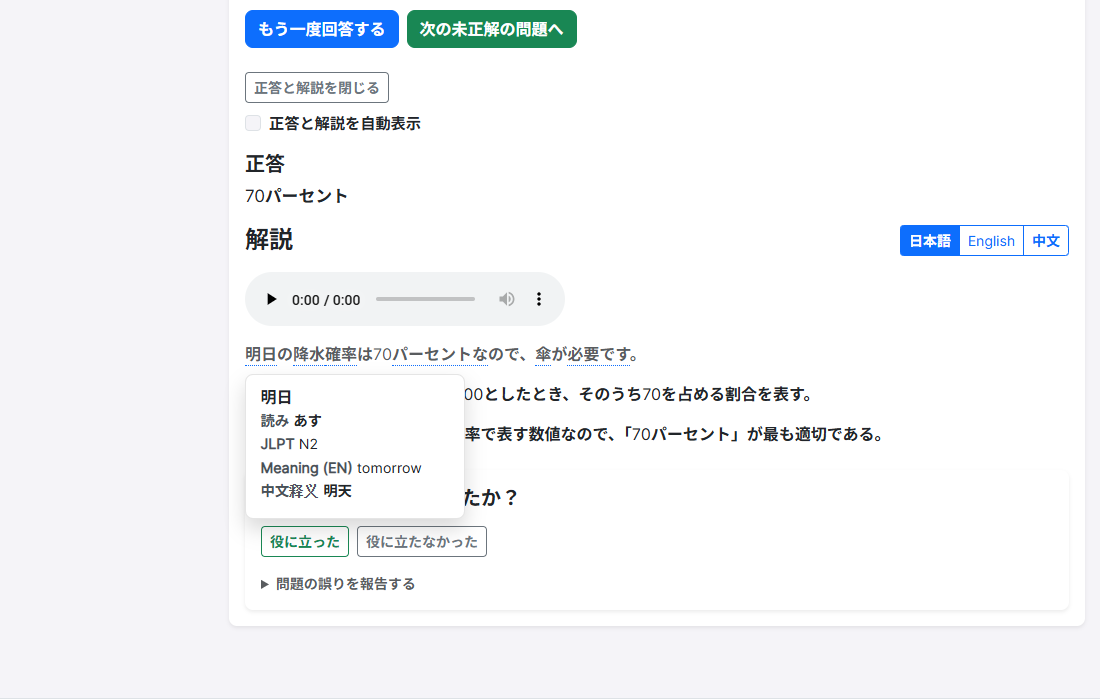
Opening another tab for a dictionary often breaks concentration. In RJT, click a linked word in the explanation panel to see reading, JLPT level, and meaning.
Use it in both vocabulary and grammar practice, then move on to the next question in the same screen.
Detailed click-by-click steps live on the how-to guide; this page focuses on the benefit.
Real RJT screen
Tap a linked word in the explanation to open a pop-up with reading and meaning.
Quick tips
- Only dictionary-linked words (for example with a dotted underline) are clickable.
- Words without a link will not open the dictionary—this is not every word.
- After checking a word, you can keep using audio and language tabs on the same page.
What is included
Only linked terms are covered. This does not claim full dictionary coverage for every word or for unpublished reading/listening content. Available in no-sign-up free practice.
Related features
Try it free—no sign-up required
Try one free question and tap a linked word in the explanation.